 Arez AI
Construction software for small contractors
Construction software built for small crews, not head offices
Arez AI is construction management software for contractors with 1 to 15 people. Estimate with AI, get the proposal signed, schedule the work, clock the crew in, track job costs and get paid, without a project manager to run the system.
Free to download. 7-day free trial, no card to start. Or start on the web.
Why most construction software is too big for a small contractor
Construction management software is usually sold to companies with estimators, project managers and an accountant, and priced and configured that way. For a small contractor, the setup alone can take longer than the jobs it is meant to manage.
Arez keeps what a small crew uses every week (the estimate, the signed proposal, change orders, the schedule, crew hours, receipts, the invoice and the payment) and makes each of them work from a phone with very little setup. The estimate is written by AI from a sentence, a photo or the plans, which is the step that usually costs the most evenings.
What it does
Everything a small contractor needs, in one app
AI estimates in less than 1 minute
Describe the job by voice or text, send a photo, or upload plans. Arez writes an itemized estimate with materials, labor hours and your markup.
Proposals clients sign on their phone
Turn the estimate into a branded proposal with your payment schedule. The client reviews and e-signs it from a link.
Change orders, signed before the work
Price the extra, send it, and get a signature before your crew starts on it.
Today and scheduling
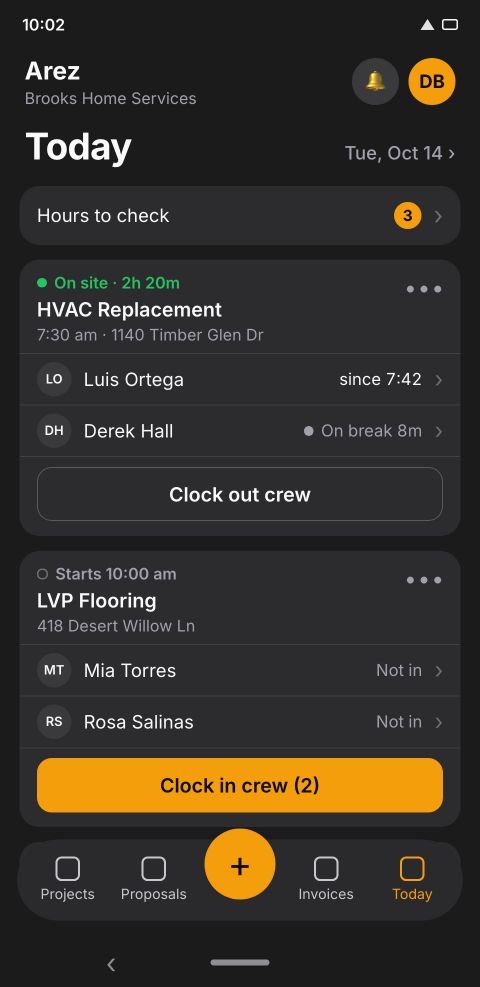
See today's visits and who is on site. Book a visit from the job or by telling the chat.
Crew clock-in and pay sheet
Your crew clocks in from the app or a shared board, without their own login. Approved hours build the pay sheet.
Receipts and job costs
Snap or share a receipt and Arez reads the vendor and total. Receipts and crew labor land on the job next to the estimate.
Tasks with photos
Checklists per job. The crew checks items off and adds photos as they finish.
Roles that hide your margins
Owner, manager and field roles. Your crew sees the job, not your markup or costs.
Invoices with online payment
Invoice from the job, with deposits and milestones. Clients pay online by card or bank transfer.
After the estimate
Run the job from your phone
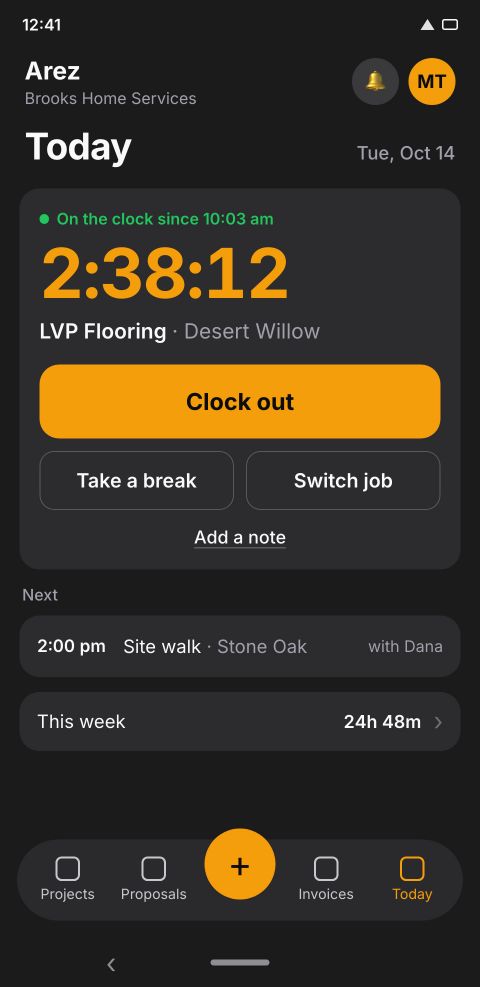
Crew time without the texting
Your crew clocks in from the app or from a shared board. You check the hours that need a look and approve the rest.
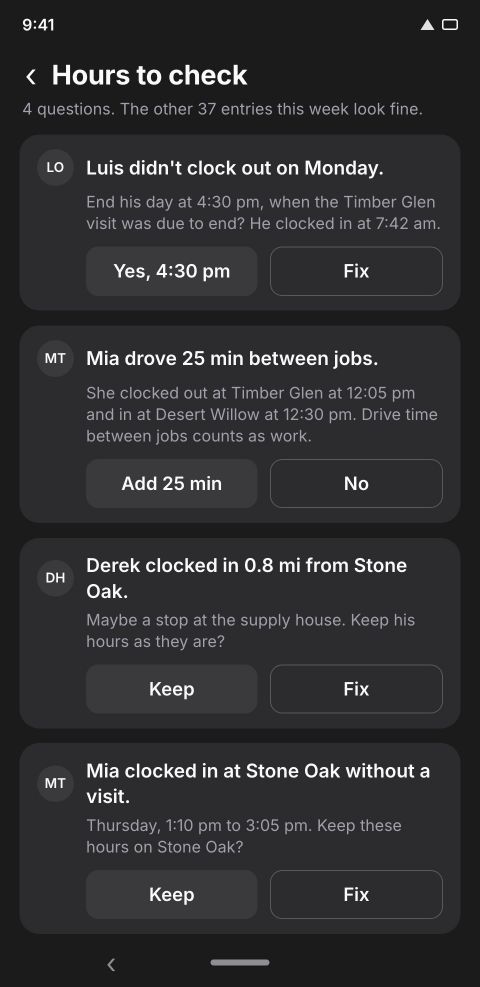
Hours to check, as plain questions
Forgot to clock out? Clocked in away from the job? Arez asks you a yes or no question instead of making you hunt through timesheets.
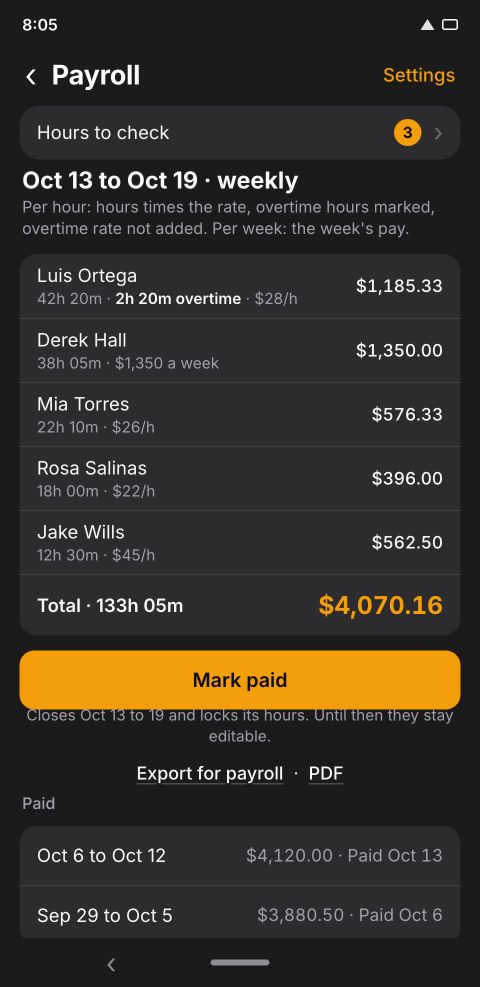
A pay sheet that adds itself up
Pay per hour or per week. Arez builds the pay sheet from approved hours, and you mark it paid.
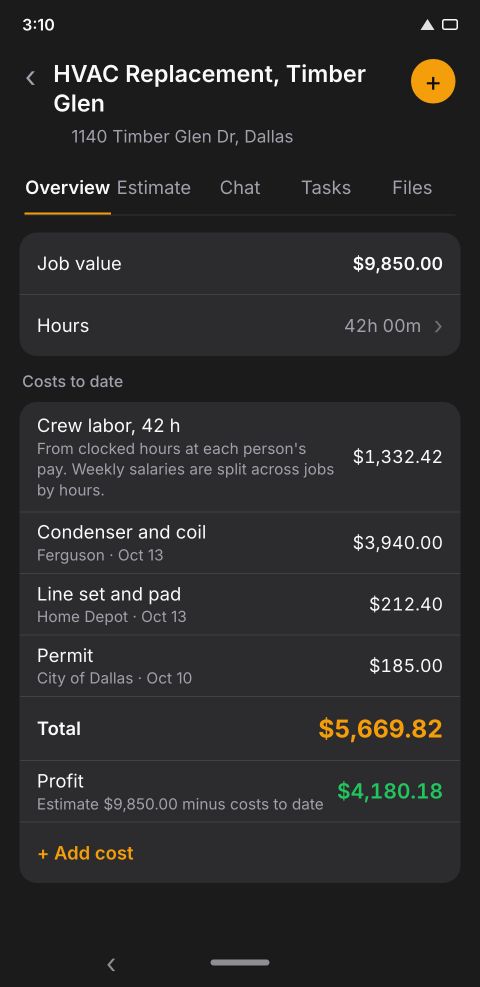
Job costs next to the estimate
Crew labor and receipts land on the job, so you see what it is costing while there is still time to act.
Compare
How Arez compares with other contractor software
| Arez AI | Construction suites (Procore, Buildertrend) | Field service apps (Jobber, Housecall Pro) | Estimate and invoice apps (Joist and others) | |
|---|---|---|---|---|
| Built mainly for | Contractors and crews of 1 to 15 people | Builders and GCs running large projects with an office team | Service businesses with recurring visits and dispatch | Solo contractors who need a clean quote and invoice |
| How an estimate starts | Say it, send a photo, or upload the plans; AI writes the line items | Cost catalogs, templates and takeoff tools | Price book items you pick | Items you type or save |
| Time to a first estimate | Less than 1 minute after you describe the job | After cost catalogs and templates are set up | After you build your price book | Minutes, typed by hand |
| Proposal with e-signature | Yes | Yes | Yes | Yes |
| Online payments | Card or bank transfer | Yes | Yes | Yes |
| Crew clock-in and pay sheet | Yes, crew need no login | Yes | Yes | Usually no |
| English and Spanish | App, voice and proposals | Varies | Varies | Varies |
This table describes each kind of tool in general; features and plans change, so check each product before you buy. If you run large commercial projects with a dedicated office staff, a construction suite is built for that. If your business is mostly recurring service visits and dispatch, a field service app fits better. Arez is for the contractor who wants the estimate written for them and the job run from a phone. For a product by product table, see Arez vs Buildertrend, Joist, JobTread and Houzz Pro.
Questions
Construction software FAQ
What is the best construction software for a small contractor?
The one your crew will actually use. For a small contractor that usually means mobile first, quick to set up, and covering the estimate through the payment in one place. Arez is built for that size of business; large commercial builders with an office team are usually better served by a full construction suite.
Is Arez construction management software?
Yes, for small jobs and small crews: scheduling, crew time with a pay sheet, tasks with photos, change orders, job costs, invoices and payments, around an AI estimate.
Can I track job costs against the estimate?
Yes. Receipts and approved crew hours are added to the job, so you can see what it is costing next to what you estimated.
How many people can use it?
Team seats are 1 on Starter, 3 on Professional and 5 on Agency, including you. Crew members who only clock in are separate from seats.
Does it handle change orders?
Yes. Price the change, send it, and the client signs it on their phone. Signed change orders are kept with the job and the contract.
Does it work on iPhone and Android?
Yes. Arez runs on iPhone, iPad and Android phones, and in a web browser at ai-arez.com/app, all on one account.
How much does it cost?
Arez is free to download with a 7-day free trial and no card to start. Plans are Starter $79, Professional $159 and Agency $259 per month. Blueprint analysis is on Agency.
Try Arez AI on your next job
Free to download. 7-day free trial, no card to start. Or start on the web.